QR Code Reader - Optiscan
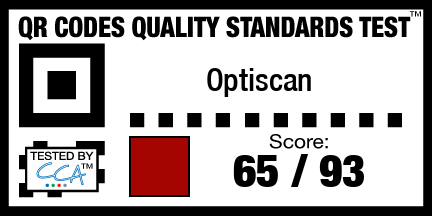
SCORE65
Score is based on results of the QR Code Quality Standards Test.
Due to missing features or bugs in the iPhone/iPad the maximum points possible for an App on this platform is 93.
This App achieves 69% of those maximum points.
Overview
Platform: iOS
Price: $1.99
iTunes Download: Optiscan - QR Code Reader
Publisher: Airsource Ltd.
Website: http://blog.airsource.co.uk/
Version: 1.8.5
Requirements: Compatible with iPhone, iPod touch, and iPad. Requires iOS 4.0 or later.
Features
- Create your own QR codes to share contacts, web addresses, text messages, phone numbers or locations with others.
- Automatically scan a wide variety of QR code data formats
- Save specific QR codes for quick sharing - perfect for sharing your business card!
- Keep a history of QR codes created and scanned for easy recall.
Installation Instructions
- Open up the product page in the Apple App Store on your phone or in iTunes. You have the choice of searching for "Optiscan", using this iTunes download Link or ( if you already have a QR Code App on your phone ) you can scan the QR code.
- If you are in Safari click "View in iTunes".
- Click the Installation button marked "$1.99 Buy App"
- If requested enter your iTunes Password
- If you are installing via iTunes you will have to sync your phone before using the App.
Test Results
Passed
|-
| Test Case 1: Phone Number || 10 points
|-
| Test Case 2: SMS Text || 10 points
|-
| Test Case 3: Email Address || 5 points
|-
| Test Case 4: Website Address || 5 points
|-
| Test Case 5: YouTube Video || 4 points
|-
| Test Case 6: FaceBook || 2 points
|-
| Test Case 7: Twitter || 2 points
|-
| Test Case 9: Events || 4 points
|-
| Test Case 10: Geo Locations || 4 points
|-
| Test Case 11.2: MeCard - Address || 5 points
|-
| Test Case 11.3: MeCard - PO Box and Extended || 2 points
|-
| Test Case 11.4: MeCard - Dates || 1 points
|-
| Test Case 11.5: MeCard - Notes || 2 points
|-
| Test Case 12.04: VCard - Title || 1 points
|-
| Test Case 12.05: VCard - Nickname || 1 points
|-
| Test Case 12.06: VCard - Role || 1 points
|-
| Test Case 12.07: VCard - Organization || 1 points
|-
| Test Case 12.08: VCard - Address || 1 points
|-
| Test Case 12.09: VCard - PO Box and Extended Address || 1 points
|-
| Test Case 12.10: VCard - Websites || 1 points
|-
| Test Case 12.12: VCard - Fax Numbers || 2 points
|-
| Total || 93 points
Failed
|-
| Test Case 11.1: MeCard - Phone || 10/10
|-
| Test Case 12.1: VCard - Basic Wikipedia || 2/2
|-
| Test Case 12.02: VCard - Types || 1/1
|-
| Test Case 12.03: VCard - Encoding || 2/2
|-
| Test Case 12.11: VCard - Phone Numbers || 2/2
|-
| Test Case 12.13: VCard - Cell Numbers || 2/2
|-
| Test Case 12.14: VCard - Pager Numbers || 1/1
|-
| Test Case 12.15: VCard - Email || 2/2
|-
| Test Case 12.16: VCard - General Chat Methods || 1/1
|-
| Test Case 12.17: VCard - Android Chat Methods || 1/1
|-
| Test Case 12.18: VCard - Other Chat Methods || 1/1
|-
| Test Case 12.20: VCard - Dates || 1/1
|-
| Test Case 12.21: VCard - Custom Labels || 1/1
|-
| Test Case 12.24: VCard - Show as Company || 1/1
Not Supported on iOS
The following are not possible due to bugs or limitations in Apples iOS operating system which apple would have to fix for them to work properly.
|-
| Test Case 8: WIFI || 0/4
|-
| Test Case 12.19: VCard - Gender || 0/1
|-
| Test Case 12.22: VCard - Relationships || 0/1
|-
| Test Case 12.23: VCard - Related Names and Labels || 0/1